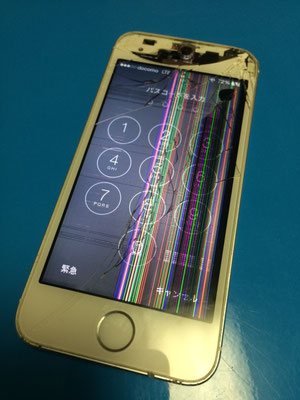
ガラス割れ 液晶修理


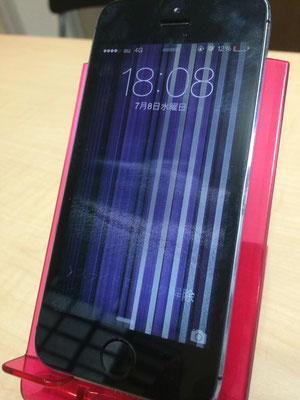
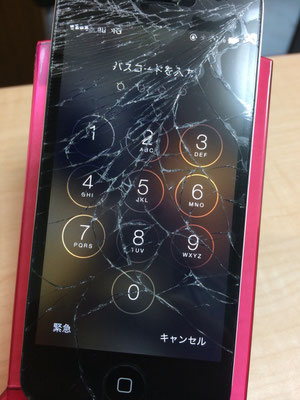

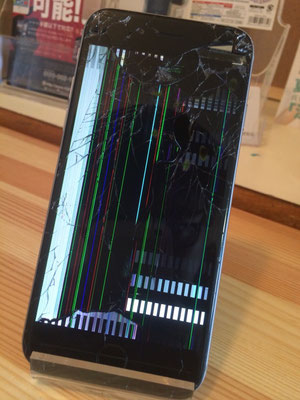
バッテリー交換

<!DOCTYPE html>
<html lang="ja">
<head>
<meta charset="UTF-8">
<meta name="viewport" content="width=device-width, initial-scale=1.0">
<title>AI修理受付コンシェルジュ</title>
<!-- Tailwind CSS for styling -->
<script src="https://cdn.tailwindcss.com"></script>
<!-- Lucide Icons -->
<script src="https://unpkg.com/lucide@latest"></script>
<!-- React & Babel for single file execution -->
<script src="https://unpkg.com/react@18/umd/react.production.min.js"></script>
<script src="https://unpkg.com/react-dom@18/umd/react-dom.production.min.js"></script>
<script src="https://unpkg.com/@babel/standalone/babel.min.js"></script>
<style>
@keyframes scan {
0%, 100% { transform: translateY(0); }
50% { transform: translateY(200px); }
}
.scan-line {
animation: scan 2s linear infinite;
background: linear-gradient(to bottom, transparent, #3b82f6, transparent);
}
body { background-color: transparent; }
</style>
</head>
<body>
<div id="root"></div>
<script type="text/babel">
const { useState, useEffect } = React;
const App = () => {
const [step, setStep] = useState(1);
const [isAnalyzing, setIsAnalyzing] = useState(false);
const [isLoading, setIsLoading] = useState(false);
const [submitted, setSubmitted] = useState(false);
const [formData, setFormData] = useState({
name: '', zip: '', address: '', model: '', tel: '', issue: '', ai_comment: ''
});
const apiKey = ""; // 実行環境から自動提供
const ADMIN_EMAIL = "[email protected]";
// 住所検索 (zipcloud)
const lookupAddress = async (zip) => {
if (zip.length !== 7) return;
setIsLoading(true);
try {
const res = await fetch(`https://zipcloud.ibsnet.co.jp/api/search?zipcode=${zip}`);
const data = await res.json();
if (data.results) {
const r = data.results[0];
setFormData(prev => ({ ...prev, address: r.address1 + r.address2 + r.address3 }));
}
} catch (e) { console.error(e); }
setIsLoading(false);
};
// AI解析 (Gemini API)
const analyzeImage = async (e) => {
const file = e.target.files[0];
if (!file) return;
setIsAnalyzing(true);
const reader = new FileReader();
reader.onloadend = async () => {
const base64Data = reader.result.split(',')[1];
const prompt = "画像(スマホ外装、設定画面、身分証)から、name(氏名), address(住所), zip(郵便番号), model(機種名), ai_comment(外観の状態)を抽出し、JSONで返してください。";
try {
const response = await fetch(`https://generativelanguage.googleapis.com/v1beta/models/gemini-2.5-flash-preview-09-2025:generateContent?key=${apiKey}`, {
method: 'POST',
headers: { 'Content-Type': 'application/json' },
body: JSON.stringify({
contents: [{ parts: [{ text: prompt }, { inlineData: { mimeType: "image/png", data: base64Data } }] }],
generationConfig: { responseMimeType: "application/json" }
})
});
const result = await response.json();
const extracted = JSON.parse(result.candidates[0].content.parts[0].text);
setFormData(prev => ({
...prev,
name: extracted.name || prev.name,
address: extracted.address || prev.address,
zip: extracted.zip || prev.zip,
model: extracted.model || prev.model,
ai_comment: extracted.ai_comment || prev.ai_comment
}));
if (extracted.zip) lookupAddress(extracted.zip.replace('-', ''));
} catch (err) {
alert("解析に失敗しました。直接入力してください。");
}
setIsAnalyzing(false);
};
reader.readAsDataURL(file);
};
const handleSubmit = () => {
setIsLoading(true);
// ここでメール送信やデータ保存の処理をシミュレート
console.log("Sending to:", ADMIN_EMAIL, formData);
setTimeout(() => {
setSubmitted(true);
setIsLoading(false);
}, 1500);
};
if (submitted) {
return (
<div className="p-8 text-center bg-white rounded-3xl shadow-xl border-t-8 border-blue-600 animate-in zoom-in duration-300">
<div className="w-20 h-20 bg-green-100 text-green-600 rounded-full flex items-center justify-center mx-auto mb-4">
<i data-lucide="check-circle-2" className="w-12 h-12"></i>
</div>
<h2 className="text-2xl font-black mb-2">受付完了しました</h2>
<p className="text-slate-500 text-sm mb-6">{formData.name} 様、ありがとうございます。<br/>管理者へ通知を送信しました。</p>
<button onClick={() => window.location.reload()} className="w-full py-4 bg-slate-900 text-white rounded-xl font-black">トップへ戻る</button>
</div>
);
}
return (
<div className="max-w-md mx-auto bg-white rounded-[2.5rem] shadow-2xl overflow-hidden border border-slate-100">
<div className="bg-slate-900 p-6 text-white flex justify-between items-center">
<div className="flex items-center gap-2">
<div className="bg-blue-600 p-1.5 rounded-lg"><i data-lucide="smartphone" size="18"></i></div>
<span className="font-black tracking-tighter">AI REPAIR INTAKE</span>
</div>
<span className="text-[10px] font-black opacity-40 uppercase tracking-widest">Step {step} / 3</span>
</div>
<div className="p-6">
{step === 1 && (
<div className="space-y-6 animate-in fade-in slide-in-from-bottom-4">
<div className="bg-blue-600 rounded-3xl p-6 text-white relative overflow-hidden">
<h3 className="text-xl font-black mb-1">AI スキャン</h3>
<p className="text-[10px] opacity-80 mb-6">外観から機種を特定、書類から住所を抽出します</p>
<label className="bg-white text-blue-600 py-4 rounded-2xl font-black flex items-center justify-center gap-2 cursor-pointer shadow-lg active:scale-95 transition-all">
<i data-lucide="camera"></i> 撮影して自動入力
<input type="file" accept="image/*" capture="environment" className="hidden" onChange={analyzeImage} />
</label>
</div>
<div className="space-y-4">
<input type="text" value={formData.name} onChange={e=>setFormData({...formData, name:e.target.value})} className="w-full p-4 bg-slate-50 rounded-xl font-bold border-2 border-transparent focus:border-blue-500 outline-none" placeholder="お名前" />
<input type="text" value={formData.model} onChange={e=>setFormData({...formData, model:e.target.value})} className="w-full p-4 bg-slate-50 rounded-xl font-bold border-2 border-transparent focus:border-blue-500 outline-none" placeholder="機種名" />
</div>
<button onClick={()=>setStep(2)} className="w-full py-5 bg-slate-900 text-white rounded-2xl font-black">次へ進む</button>
</div>
)}
{step === 2 && (
<div className="space-y-6 animate-in slide-in-from-right-4">
<div className="space-y-4">
<div className="flex gap-2">
<input type="tel" value={formData.zip} onChange={e=>{setFormData({...formData, zip:e.target.value}); if(e.target.value.length===7) lookupAddress(e.target.value);}} className="flex-1 p-4 bg-slate-50 rounded-xl font-bold outline-none" placeholder="郵便番号" />
<button onClick={()=>lookupAddress(formData.zip)} className="bg-slate-100 px-4 rounded-xl text-slate-400"><i data-lucide="search"></i></button>
</div>
<input type="text" value={formData.address} onChange={e=>setFormData({...formData, address:e.target.value})} className="w-full p-4 bg-slate-50 rounded-xl font-bold outline-none" placeholder="住所" />
<input type="tel" value={formData.tel} onChange={e=>setFormData({...formData, tel:e.target.value})} className="w-full p-4 bg-slate-50 rounded-xl font-bold outline-none" placeholder="電話番号" />
<select value={formData.issue} onChange={e=>setFormData({...formData, issue:e.target.value})} className="w-full p-4 bg-slate-50 rounded-xl font-bold outline-none appearance-none">
<option value="">故障内容</option>
<option value="画面修理">画面修理</option>
<option value="バッテリー">バッテリー交換</option>
<option value="その他">その他</option>
</select>
</div>
<div className="flex gap-2">
<button onClick={()=>setStep(1)} className="flex-1 py-5 bg-slate-100 rounded-2xl font-black">戻る</button>
<button onClick={()=>setStep(3)} className="flex-[2] py-5 bg-blue-600 text-white rounded-2xl font-black">確認へ</button>
</div>
</div>
)}
{step === 3 && (
<div className="space-y-6 animate-in zoom-in-95">
<div className="bg-slate-900 p-8 rounded-[2rem] text-white space-y-4">
<div><p className="text-[10px] opacity-40 uppercase">Customer</p><p className="text-xl font-black">{formData.name} 様</p></div>
<div><p className="text-[10px] opacity-40 uppercase">Device / Issue</p><p className="font-bold">{formData.model} / {formData.issue}</p></div>
<div className="text-[10px] opacity-40 border-t border-slate-800 pt-4 font-bold flex items-center gap-1">
<i data-lucide="mail" size="12"></i> 通知先: {ADMIN_EMAIL}
</div>
</div>
<button onClick={handleSubmit} disabled={isLoading} className="w-full py-6 bg-green-600 text-white rounded-[2rem] font-black text-xl shadow-xl flex items-center justify-center gap-2">
{isLoading ? <i data-lucide="loader-2" className="animate-spin"></i> : <i data-lucide="send"></i>}
受付を確定する
</button>
<button onClick={()=>setStep(2)} className="w-full text-slate-400 font-bold text-xs">修正する</button>
</div>
)}
</div>
{isAnalyzing && (
<div className="absolute inset-0 bg-slate-900/80 backdrop-blur-sm flex items-center justify-center z-50 rounded-[2.5rem]">
<div className="text-center text-white p-6">
<div className="relative w-32 h-32 mx-auto mb-4 border-2 border-blue-500 rounded-lg overflow-hidden">
<div className="scan-line absolute w-full h-1"></div>
<i data-lucide="scan-search" className="w-full h-full p-6 text-blue-400 opacity-50"></i>
</div>
<p className="font-black">AI 機種鑑定中...</p>
<p className="text-[10px] opacity-60 mt-1 uppercase tracking-widest">Visual Analysis</p>
</div>
</div>
)}
</div>
);
};
const root = ReactDOM.createRoot(document.getElementById('root'));
root.render(<App />);
setTimeout(() => lucide.createIcons(), 500);
</script>
</body>
</html>